Stakeholders spend more time evaluating placeholder content than the layout decisions it’s meant to showcase. Eye-tracking studies on design reviews consistently show reviewers fixating on text and imagery that reads as obviously fake — pulling their attention away from hierarchy, spacing, and usability, which is what the review was supposed to be about in the first place. That single fact explains why content population deserves more thought than most workflows give it.
Why Not Just Use Lorem Ipsum Everywhere?
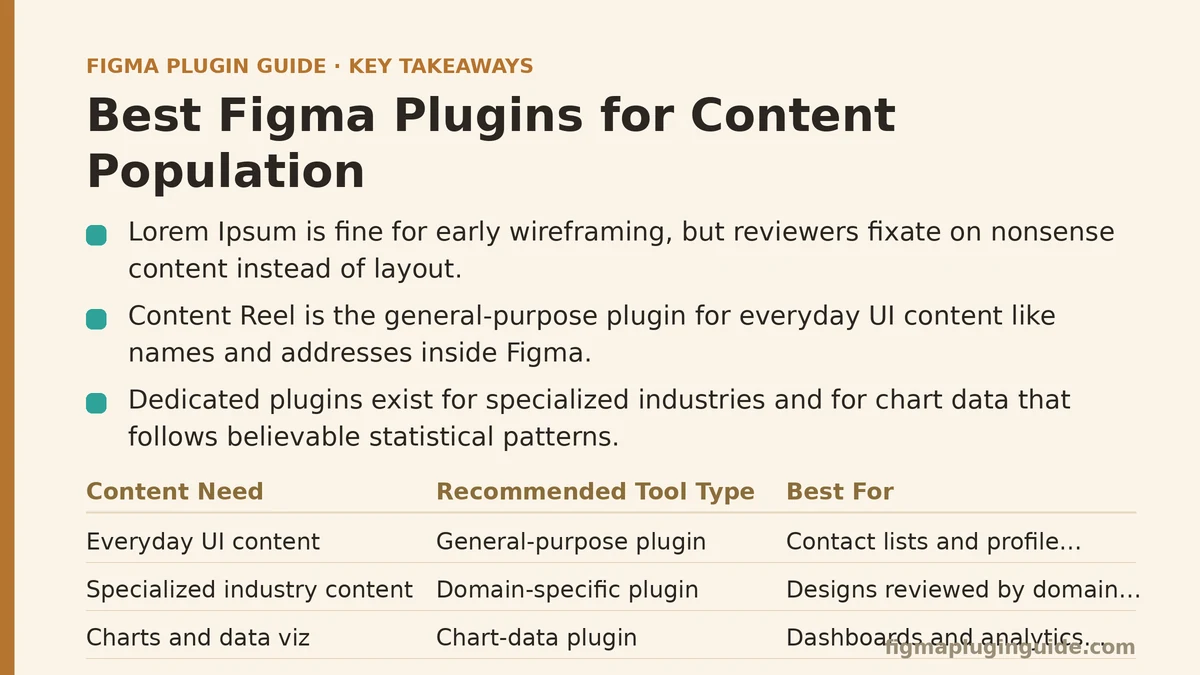
Lorem Ipsum is fast, and for pure layout testing, that’s often enough. The trouble starts when a design moves past internal layout checks and into a review with people who aren’t looking at boxes and grids — they’re looking at whether the product feels real.
Names in Lorem Ipsum don’t vary in length the way real names do. Paragraphs don’t break the way real sentences break. Once a stakeholder notices the content is nonsense, their feedback tends to drift toward “this doesn’t look right” rather than the structural feedback you actually need. Lorem Ipsum still has a legitimate place — early wireframing, mostly — but treating it as a universal default creates friction later in the process that a better tool would have avoided.
What’s the Best General-Purpose Plugin for Realistic Content?
Content Reel remains the default answer for most designers, and for good reason. It generates names, addresses, profile photos, and other common data types directly inside Figma, without requiring a trip to an external generator and a manual copy-paste cycle.
Best for: Everyday UI work — contact lists, profile cards, dashboard fields — where content needs to look plausible but doesn’t require industry-specific accuracy.
Not ideal for: Specialized domains where generic realistic content still reads as off-target to someone familiar with that field’s actual data patterns.
What If My Design Is in a Specialized Industry?
This is where general-purpose tools stop being sufficient. A healthcare dashboard populated with generic names and addresses will still look wrong to a clinician reviewing it, because the terminology, patient data patterns, and record structures don’t match what that industry’s real content looks like.
A smaller set of plugins targets these gaps directly — generating medical terminology, financial data patterns, legal document structures, and similar domain-specific content. These tools exist precisely because broad plugins were never built with a single industry’s conventions in mind.
Best for: Any design work reviewed by domain experts who will notice when placeholder content doesn’t match their field’s actual conventions.
How Do I Handle Charts and Data Visualizations?
Numbers are a different problem than text. A chart populated with random values doesn’t just look unrealistic — it can actively mislead a stakeholder’s read of the design, since trend lines and bar heights carry meaning even when the underlying data is fake.
Dedicated chart-data population plugins solve this by generating numbers that follow believable statistical patterns — trends, seasonality, plausible ranges — rather than pure randomness. General content tools, built around names and text, aren’t designed for this kind of numerical structure.
Best for: Dashboards, analytics tools, and any interface where the audience is evaluating how well the design communicates data, not just how it looks.
Is Stock Photo Search Enough for Image Placeholders?
Usually, yes. Plugins in the Unsplash mold cover a wide range of general image needs quickly. But two specific situations tend to expose their limits.
First, aspect ratio consistency across a large grid — stock search results vary in dimensions, and manually cropping dozens of images to match is its own tedious task. Second, deliberate representation across a set of placeholder people photos, which matters when a design is being reviewed specifically for inclusivity and general search results skew inconsistent by default.
Best for general search: Most everyday image placeholder needs. Best for specialized tools: Grid layouts requiring strict aspect-ratio consistency, or reviews where representation across placeholder photos is itself part of the evaluation criteria.
Which Plugin Should I Actually Reach for First?
It depends on what stage the design is at and who’s going to be looking at it.
| Situation | Recommended Tool | Reasoning |
|---|---|---|
| Early wireframing, layout only | Lorem Ipsum generator | Content accuracy doesn’t matter yet |
| General UI review | Content Reel or similar | Broad realism without extra setup |
| Domain-expert review | Industry-specific plugin | Generic content won’t hold up to scrutiny |
| Dashboard or analytics design | Chart-data generator | Numbers need believable patterns, not random values |
| Large image grid | Specialized image plugin | Aspect ratio and representation control matters |
If you’re unsure which row applies, ask who’s reviewing the design next. That answer usually points to the right tool faster than guessing based on habit.
Does the Right Choice Change as a Project Matures?
It does, and this is worth planning for rather than discovering mid-project. A design that starts with Lorem Ipsum during layout exploration should typically graduate to Content Reel-style realistic content before a broader review, and then to industry-specific or chart-data tools once the design reaches the stage where domain accuracy or data communication becomes part of what’s being judged.
Treating content population as a one-time setup step, rather than something that evolves alongside the design, is a common reason teams end up with mismatched placeholder content late in a project — text that was fine for internal wireframing but never got upgraded before a client saw it.
A Short Diagnostic for Choosing a Tool
Ask yourself these three questions before opening a plugin panel:
- Who is reviewing this next? Internal team, external stakeholder, or domain expert — each expects a different level of content realism.
- Does the content type carry meaning? Charts and data-heavy fields need pattern-aware generation; static text usually doesn’t.
- How specialized is the domain? General tools cover broad UI work fine; specialized fields need specialized plugins.
Answering these honestly tends to point directly at one of the categories above, without much second-guessing needed.
Which of these situations matches what you’re working on right now — early wireframing, a domain-specific review, or a data-heavy dashboard? That answer is usually enough to narrow the plugin choice down to one category. Related guides: Best Figma Plugins for AI Design Automation, Best Figma Plugins for Icon Design and Management, and Best Figma Plugins for Motion and Animation Design.