There’s a common assumption that AI plugins in Figma are meant to replace design judgment — generate a screen, ship it, done. That’s not what the useful ones do. The plugins worth installing automate the repetitive, mechanical steps around a design decision — populating variants, drafting placeholder copy, restructuring layers into clean auto-layout — while leaving the actual decisions to the person who understands the product. Treating AI output as a finished result rather than a fast first draft is where most frustration with these tools originates.
This post is organized around symptoms you’re likely to hit while using AI design plugins, what typically causes them, and how to fix or avoid them. If you’ve run into one of these already, skip straight to it.
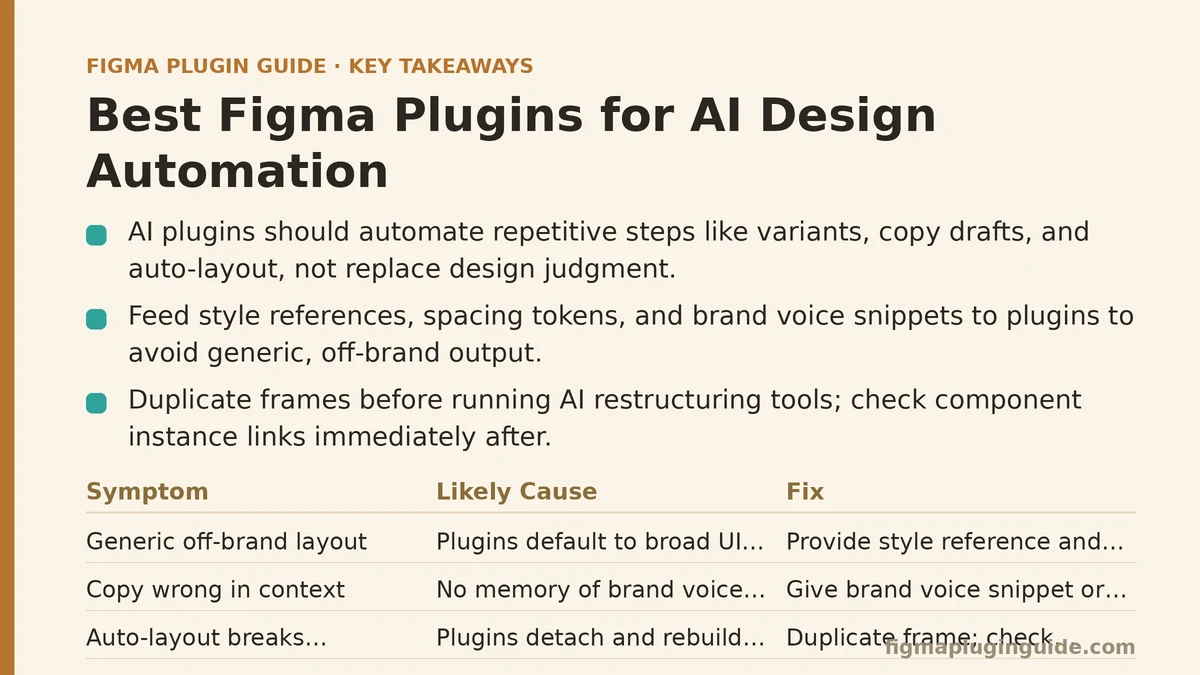
Symptom: The AI-Generated Layout Looks Generic and Off-Brand
You prompt a text-to-design plugin for a pricing page or dashboard, and what comes back is structurally sound but visually indistinguishable from a hundred other AI-generated screens — same rounded cards, same spacing rhythm, same default type scale.
Likely cause: Most generation plugins are trained or configured around broad UI conventions rather than your specific design system. Without a style reference, they default to whatever pattern is statistically common, which is precisely why the output feels interchangeable.
Fix: Look for plugins that accept a style reference — an existing frame, a linked component library, or a set of design tokens — before generating. Feeding the plugin your actual spacing scale and color tokens narrows the gap between “plausible UI” and “on-brand UI” considerably. If a plugin doesn’t support this, treat its output strictly as a structural draft and expect to swap in your own components afterward.
Symptom: Generated Copy Reads Fine in Isolation but Wrong in Context
Placeholder headlines and button labels from an AI copywriting plugin often sound polished on their own, then feel oddly generic or slightly off-tone once dropped into the actual screen next to your real product name and voice.
Likely cause: Copy-generation plugins typically work from the prompt and surrounding text layers alone. They have no memory of your brand voice guidelines, past campaigns, or the specific terminology your product uses internally.
Fix: Give the plugin more context than the bare prompt — paste in a short brand voice snippet, or reference existing approved copy from the file, if the plugin supports that input. For anything customer-facing, treat AI copy as a structural placeholder for length and tone testing rather than final content, and route it through the same review a human draft would get.
Symptom: Auto-Layout Restructuring Breaks Existing Component Instances
An AI layout-cleanup plugin promises to convert a messy frame into proper auto-layout, and it does — but component instances inside that frame lose their connection to the main component, or padding values get reset in ways that don’t match your spacing tokens.
Likely cause: These plugins generally operate by detaching and rebuilding layer structure to apply auto-layout rules. Detaching is often a side effect of that rebuild process, and it isn’t always flagged clearly before you run it.
Fix: Duplicate the frame before running any AI restructuring tool, and check component instance links immediately after. Some plugins include a “preview changes” step before committing — use it every time rather than trusting the default run. If a plugin lacks a preview mode, it’s worth testing on a throwaway frame before applying it to production files.
Symptom: AI-Generated Variants Don’t Match Your Naming or State Conventions
A plugin generates a full set of button or input variants — hover, disabled, error, focused — but names them inconsistently with your existing property naming, forcing manual cleanup before the set is usable in your design system.
Likely cause: Variant-generation plugins tend to use generic default naming (state=hover, state=disabled) rather than reading and matching the property names already present in your file.
Fix: Check whether the plugin lets you define naming conventions or property templates before generation runs — some do, buried in settings most people skip past. If it doesn’t, budget time for a rename pass immediately after generation, before the variants get used anywhere else in the file. Skipping this step is how naming inconsistency quietly spreads across a design system.
Symptom: AI Image Generation Produces Inconsistent Subject Representation
Across a batch of AI-generated placeholder photos or illustrations for a set of user profile cards, the results skew inconsistent — different art styles, different levels of representation, different image quality within the same batch.
Likely cause: Many AI image plugins generate each image independently per prompt call, without a shared style seed or consistency setting locked across the batch.
Fix: Use plugins that support a fixed style seed or reference image across an entire generation batch, rather than running the prompt separately for each placeholder. If the plugin doesn’t support batch consistency, generate a smaller set, manually select the ones that match in style, and reuse those rather than regenerating individually for each card.
Symptom: Design-to-Code Output Compiles but Doesn’t Match Your Codebase Conventions
An AI design-to-code plugin exports working component code, but the naming conventions, prop structure, or styling approach (inline styles versus your team’s CSS-in-JS setup, for instance) doesn’t match what your engineering team actually uses.
Likely cause: These plugins generate code against a generic or configurable default framework template, not your team’s specific conventions, unless those conventions were explicitly configured beforehand.
Fix: Check the plugin’s settings for a custom code template or style-output configuration before exporting anything meant for production use. Treat first-pass export as a structural reference for the engineering team rather than copy-paste-ready code, and confirm with a developer early rather than assuming the export is production-ready by default.
Symptom: Generation Feels Slow or Inconsistent Across Runs
You run the same prompt twice on a text-to-design or copy plugin and get noticeably different quality results — one run is usable, the next needs a full redo.
Likely cause: Generation-based plugins rely on underlying AI models with inherent variability run to run, and prompt specificity has an outsized effect on consistency. Vague prompts amplify that variability; specific ones reduce it.
Fix: Write prompts that specify structure explicitly — number of sections, content type per section, tone — rather than a broad one-line description. Narrower prompts consistently produce more usable first drafts, and it’s a rare plugin that performs well with vague input regardless of how capable its underlying model is.
A Quick Diagnostic Checklist Before You Blame the Plugin
Before assuming a plugin is unreliable, run through this short list:
- Did you give it style or brand context, or just a bare prompt?
- Did you preview changes before committing them to a real file?
- Are you treating the output as a first draft, or as a finished asset?
- Does the plugin support batch consistency settings you haven’t turned on yet?
- Have you tested it on a throwaway frame first, or gone straight to production?
Most of the friction people report with AI design plugins traces back to one of these five points rather than a fundamental limitation of the tool itself.
The Underlying Pattern Across All of These Fixes
Every symptom above shares a root cause: AI plugins default to generic behavior unless given explicit context, and they rarely flag the side effects of their own automation clearly. The fix is almost never “find a better plugin” — it’s giving the plugin you already have more specific input, checking its output before trusting it, and keeping a clear line between what it drafted and what’s ready to ship.
Which of these symptoms matches what you’ve run into most recently? Identifying the pattern is usually the fastest way to figure out whether the fix is a settings change, a workflow adjustment, or simply a more specific prompt. Related guides: Best Figma Plugins for Icon Design and Management, Best Figma Plugins for Motion and Animation Design, and Best Figma Plugins for UI Design in 2026.