Say you are trying to sync 600 design tokens from a Figma file into an external design system repository, and the sync works perfectly on your test file with 40 tokens, and then fails halfway through on the real file with an error you don’t recognize: 429 Too Many Requests. Nothing in your code changed. The file just got bigger. This is the moment most plugin developers first encounter rate limiting as a real constraint rather than a theoretical one, and it’s worth walking through exactly what happens next, because the fix isn’t a single line of code — it’s a handful of decisions that compound.
The Setup: A Token Sync Plugin That Works Fine Until It Doesn’t
The plugin in question reads every color, spacing, and typography variable in a Figma file and pushes each one, individually, as a separate request to an external API that stores them for a connected codebase. During development, this looked clean. Loop over the variables, call fetch() for each one, show a progress bar, done. Forty tokens meant forty requests, all completing in under two seconds.
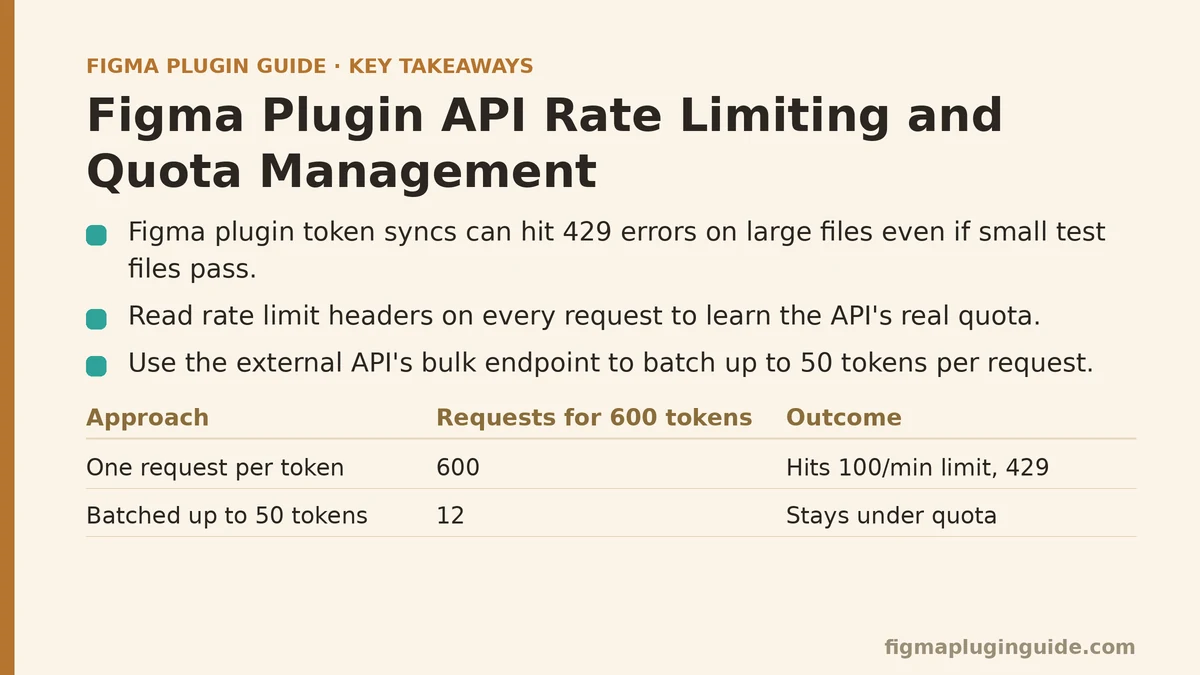
The problem showed up the first time a real user ran it against a production file. Six hundred tokens meant six hundred requests, fired in rapid succession because nothing in the loop paused between calls. The external API’s rate limiter — a fairly standard 100-requests-per-minute ceiling — started rejecting requests around call number 110, and every rejection came back as a 429 with no retry logic to catch it. The plugin’s UI just froze on “Syncing token 112 of 600” and stayed there.
This is the exact failure mode that separates plugins that work in a demo from plugins that hold up under real usage. It’s not a bug in the traditional sense — the code did precisely what it was written to do. The gap was in never having modeled how the target API’s quota behaves under load.
Step One: Reading the Rate Limit Instead of Guessing at It
Before touching the retry logic, the first fix was figuring out what the API actually enforces. Most APIs — including Figma’s own REST API — return rate limit information directly in response headers: X-RateLimit-Limit, X-RateLimit-Remaining, and X-RateLimit-Reset, or some close variant of that naming. The external token API in this case used a similar convention.
Logging those headers on every request, even successful ones, turned out to be the single most useful diagnostic step in the whole process. It confirmed the limit was 100 requests per 60-second window, and that the remaining-count header was ticking down in real time — visible proof of exactly when the plugin would start failing, well before the failures themselves showed up.
This matters because guessing at rate limits leads to either overly conservative throttling that makes the plugin feel sluggish for no reason, or overly optimistic throttling that still trips the limit under slightly heavier load than whatever was tested. Reading the actual headers removes the guesswork entirely, and it’s available in nearly every well-designed API, including Figma’s.
Step Two: Batching Requests Instead of Firing Them One at a Time
The token sync plugin’s core mistake was structural: one API call per token, with no batching at all. The external API, as it turned out, supported a bulk endpoint capable of accepting up to 50 tokens in a single request — a feature the original implementation never used because the single-token endpoint was what the documentation’s quickstart example showed.
Switching to the bulk endpoint cut the 600 individual calls down to 12 batched calls. That single change moved the plugin from “will hit rate limits on any file over roughly 100 tokens” to “unlikely to hit rate limits on any file a typical designer would produce.” Batching doesn’t just reduce the raw request count — it reduces it by whatever factor the batch size allows, which is often the difference between a plugin that scales and one that doesn’t.
The general lesson here extends past this one plugin: before writing retry or backoff logic, check whether the target API offers a bulk or batch endpoint. Handling rate limits gracefully is good practice. Avoiding the need to handle them in the first place, where the API supports it, is better.
Step Three: What to Do When Batching Isn’t Enough on Its Own
Even at 12 batched requests, a large enough file — say, one with 3,000 tokens instead of 600 — would still push past the 100-per-minute ceiling eventually. Batching reduces the frequency of hitting the limit; it doesn’t eliminate the possibility. So the next layer was a request queue with built-in throttling, rather than firing all 12 (or however many) batches back to back.
The queue held every batch request and released them at a rate calculated from the X-RateLimit-Remaining and reset-time headers read earlier. If 40 requests remained in the current window, the queue would let 40 through before pausing until the window reset. This is a meaningfully different approach from a fixed delay between calls — a flat “wait 600ms between requests” rule works until traffic patterns change, while a queue that reads the live remaining-count adapts to whatever the API is currently allowing.
For plugin developers without the patience to build a custom queue from scratch, a simpler middle ground works almost as well: a fixed concurrency limit (process no more than 5 requests at once) combined with a fixed delay between batches. It’s less precise than reading live headers, but it’s dramatically better than firing everything at once, and it takes a fraction of the code.
Step Four: Handling the 429s That Still Get Through
Even with batching and a throttled queue, some 429 responses are close to unavoidable — a slow network retry, a race condition between two rapid plugin runs, or another user of the same API key hitting the same quota simultaneously. The plugin needed a retry strategy for whatever slipped past the queue’s own throttling.
Exponential backoff with jitter turned out to be the standard, and for good reason. A naive retry — try again immediately, or try again after exactly one second every time — tends to create a thundering-herd effect where every failed request retries at the same moment and re-triggers the same limit. Exponential backoff spaces retries out progressively (1 second, then 2, then 4, then 8), and the added jitter — a small random offset on each delay — prevents synchronized retries from stacking up in the first place.
The retry logic also needed a ceiling. Without a maximum retry count, a persistently rate-limited request would retry indefinitely and leave the plugin’s UI in limbo with no clear failure state. Capping retries at four or five attempts, then surfacing a clear error to the user rather than a silent hang, turned an invisible failure into an actionable one.
Step Five: Communicating Quota Status Inside the Plugin UI
None of the backend fixes above matter much to a user staring at a stalled progress bar with no explanation. The last piece of the fix was surfacing quota information directly in the plugin’s interface — not as raw header data, but as something a non-technical user could act on.
The updated UI showed a simple message during any throttled pause: “Syncing 340 of 600 tokens — pausing briefly to stay within API limits.” This one change eliminated most of the support questions the plugin had been generating, because users no longer interpreted a brief pause as a crash. A rate-limited plugin that communicates what it’s doing reads as considerate. The same plugin, silent, reads as broken.
For plugins that regularly approach quota limits, showing a running count — “420 of 500 requests used this hour” — gives users enough context to plan around it, rather than discovering the limit only when it’s hit.
What Changed, End to End
| Before | After |
|---|---|
| One API call per token | Batched calls, up to 50 tokens per request |
| No visibility into remaining quota | Rate-limit headers read and logged on every call |
| Requests fired without throttling | Queue that releases requests based on live remaining-count |
No retry logic on 429 | Exponential backoff with jitter, capped at five attempts |
| Silent freeze on failure | UI message explaining any throttled pause |
| Users assumed the plugin had crashed | Users saw an explained, temporary delay |
The plugin didn’t get faster in the way most performance work makes something faster. It got more predictable — which, for anything touching a shared external quota, matters more than raw speed. A sync that takes 90 seconds and finishes reliably beats one that takes 20 seconds and fails on any file above a certain size.
The Pattern Behind the Specific Fixes
Strip away the token-sync specifics and what’s left is a sequence that applies to nearly any Figma plugin calling an external API, or even Figma’s own REST endpoints, under real usage rather than test conditions:
- Read the actual rate limit from response headers rather than assuming a number from documentation that may be outdated or per-tier.
- Batch wherever the API allows it, since reducing request count is more effective than any retry strategy applied afterward.
- Throttle proactively with a queue or concurrency limit, rather than relying entirely on reactive retry logic.
- Retry failures with exponential backoff and jitter, capped at a fixed number of attempts, so a stuck request eventually surfaces as a clear failure instead of an indefinite hang.
- Tell the user what’s happening, in plain language, whenever the plugin pauses for reasons outside their control.
None of these five steps is complicated in isolation. The failure mode in the original plugin wasn’t a lack of technical skill — it was skipping straight to writing the feature without first asking how the target API behaves once real usage exceeds whatever was tested. That question is worth asking before the first line of request-handling code gets written, not after the first user reports a plugin that silently stalls at token 112.
Related guides: Figma Plugin UI/Main Thread Communication: A Myth vs. Reality Guide, Figma Plugin Performance Optimization Tips, and Figma REST API vs Plugin API: When to Use Each.