Say you are trying to turn a plugin that already has a few hundred weekly active users into something that pays for the time you put into it. You open the Figma Community dashboard, look at the usage graph trending upward, and realize you have no idea what to do next. Do you gate features? Charge a flat fee? Use Figma’s own payment system or route around it? The plugin works. The business model doesn’t exist yet.
That gap — between “people use this” and “this generates revenue” — is where most plugin developers get stuck. This guide walks through it as a series of symptoms you’re likely to hit, what’s usually causing each one, and the fix that tends to resolve it.
Symptom: You Have Users, But No Idea What to Charge Them For
The plugin does something useful. People install it, use it a few times a week, and never leave feedback about missing features. That silence feels like a dead end when you’re trying to figure out where a paywall could go.
Cause: Usage data alone doesn’t tell you what’s valuable — it tells you what’s free. Most users won’t request paid features from a plugin that has never charged them for anything, because there’s no reason to ask.
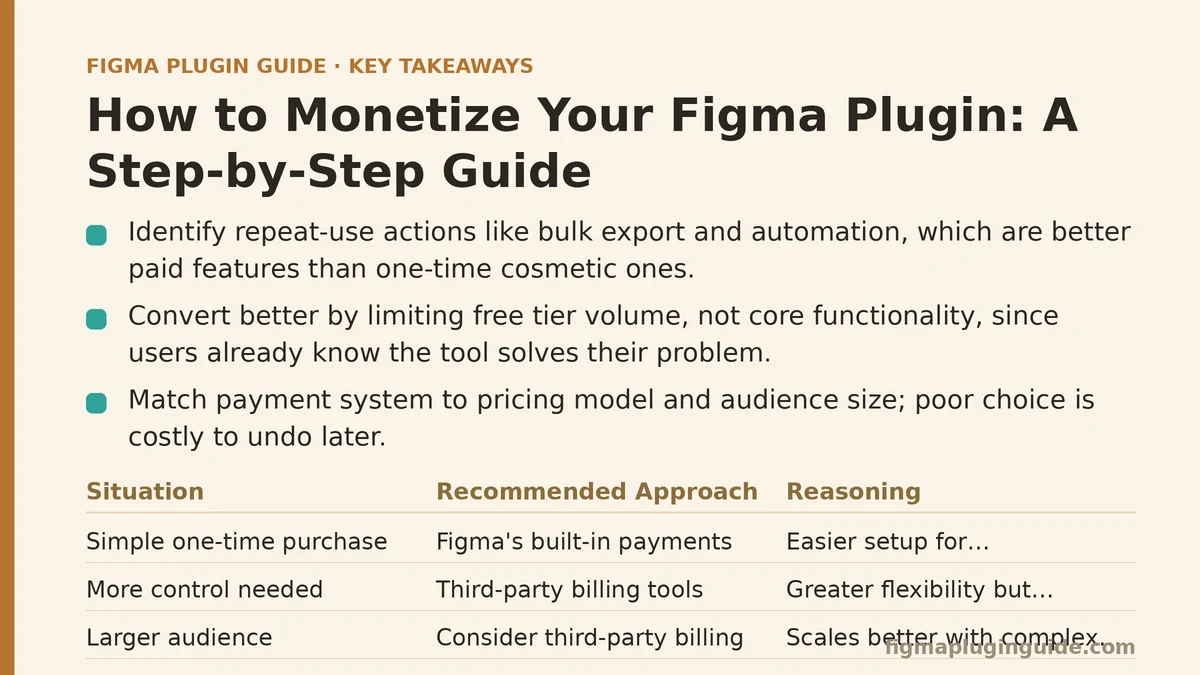
Fix: Look at your plugin’s usage logs (or add lightweight analytics if you don’t have them) and identify the specific actions that correlate with repeat use rather than one-time trial. A feature used once by many people is a discovery hook. A feature used repeatedly by a smaller subset is closer to something worth charging for. Bulk export, batch processing, and automation of otherwise-manual repetitive tasks tend to fall into that second category more often than cosmetic features do — repetition is what turns a nice-to-have into a paid tier.
Symptom: You Built a Paywall, But Conversion Is Near Zero
You’ve added a free tier and a paid tier. The free tier gets plenty of installs. Almost nobody upgrades, even though the pricing seems reasonable compared to similar tools.
Cause: This usually means the free tier is doing too much of the job on its own. If a user can complete their actual task without hitting a limit, there’s no moment where the upgrade prompt makes sense to them — it just reads as a nag screen.
Fix: Rework the split so the free tier demonstrates the plugin’s value clearly but caps out at a point tied to real usage, not an arbitrary number. A common working pattern: unlimited access to core functionality, with limits placed on volume (number of exports, number of items processed per run, number of saved presets) rather than on functionality itself. Volume-based limits tend to convert better than feature-based limits, because the user has already proven to themselves that the tool solves their problem — the friction is capacity, not doubt.
Symptom: You’re Not Sure Whether to Use Figma’s Built-In Payments or Handle Billing Yourself
Figma supports in-app payments for plugins directly through its own commerce system. Third-party billing tools like Stripe, LemonSqueezy, or Paddle offer more control but require more setup. Picking wrong here is expensive to undo later, since migrating existing paying users between systems tends to be messy.
Cause: Developers often default to whichever option they’ve heard of first, rather than checking it against their actual pricing model and audience size.
Fix: Match the payment system to your plugin’s shape, not to convenience:
| Situation | Recommended Approach | Reasoning |
|---|---|---|
| Simple one-time purchase or single subscription tier | Figma’s built-in payments | Lowest setup friction, users trust the native flow |
| Multiple pricing tiers or team/seat-based billing | Third-party billing (Stripe, etc.) | Native system isn’t built for complex tier logic |
| Plugin sold alongside a broader product or web app | Third-party billing | Keeps billing consistent across your whole product line |
| Early-stage plugin, testing willingness to pay | Figma’s built-in payments | Fastest path to a working paywall, low commitment |
If your pricing model is simple today but you expect it to grow into tiers or seats within a year, it’s worth starting with third-party billing even though it takes longer to set up. Migrating a payment system after you have paying customers is one of the more disruptive things you can do to a plugin’s revenue.
Symptom: People Try the Plugin Once and Never Come Back — Paid or Free
Install numbers look fine. Return usage does not. Whatever monetization plan you build sits on top of a user base that isn’t sticking around long enough to consider paying.
Cause: This is rarely a pricing problem. It’s usually a first-run experience problem — the plugin’s value isn’t obvious within the first thirty seconds of use, so people close it and move to the next result in their search.
Fix: Before touching your pricing strategy, audit the onboarding flow. Does the plugin produce a visible, useful result on the very first action, with zero configuration required? If a user has to read documentation, adjust settings, or figure out the “right” way to use it before seeing value, that’s the leak to patch first. Monetization built on top of weak retention just monetizes a smaller and smaller group of increasingly committed users, while everyone else churns out before they ever see a paywall.
Symptom: Your Pricing Looks Fine on Paper But Revenue Is Flat Month Over Month
The paywall converts at a reasonable rate. New users keep signing up. Yet total revenue isn’t growing the way the install count suggests it should.
Cause: Flat revenue despite growing installs is almost always a churn problem, not an acquisition problem. Subscriptions lapse, one-time purchases don’t recur, and if new paying customers roughly equal the customers leaving, the top-line number stays still no matter how many new installs happen upstream.
Fix: Track churn as its own metric, separate from conversion rate. If churn is high, look specifically at what happens after the first month of paid use — that’s where most subscription cancellations concentrate, usually because the plugin solved an immediate problem and then had nothing further to offer. Adding recurring value (regular content updates, new export formats, ongoing library additions) gives a subscription a reason to continue past the initial problem it was bought to solve.
Symptom: You Don’t Know If the Plugin Is Even Worth Monetizing Yet
Maybe the user count is small. Maybe engagement is inconsistent. You’re not sure if the right move is to build a payment system now or wait until the numbers look more convincing.
Cause: There’s a natural hesitation to commit engineering time to billing infrastructure before you’re confident demand exists. That hesitation is reasonable, but it can also stall a plugin in permanent “maybe later” mode indefinitely.
Fix: Use a simple threshold rather than a gut feeling. A commonly cited rule of thumb: if a plugin sustains 500+ weekly active users for two consecutive months without any marketing push behind it, that’s usually a strong enough signal to justify building a paid tier. Below that, spend your remaining time on retention and onboarding instead — the fixes discussed two sections up — since a monetization layer built on top of a shrinking or stagnant user base rarely performs well regardless of how it’s priced.
A Quick Reference for Where to Start
| Symptom | Likely Cause | Fix |
|---|---|---|
| No clear idea what to charge for | Usage data hasn’t been reviewed for repeat-use patterns | Identify features tied to repeated, not one-time, use |
| Paywall exists but conversion is near zero | Free tier already solves the user’s task fully | Shift limits from features to usage volume |
| Unsure which payment system to use | Payment choice made by habit, not by pricing model | Match system to tier complexity using the table above |
| Users try once and never return | Weak first-run experience, not a pricing issue | Fix onboarding before touching pricing |
| Revenue flat despite install growth | Churn offsetting new paying users | Track churn separately, add recurring value |
| Not sure if it’s worth monetizing yet | No threshold for the decision | Use a usage benchmark instead of a gut call |
Where This Usually Leads
Most of these symptoms trace back to one of two root issues: either the plugin hasn’t earned enough trust from its users yet, or the pricing structure doesn’t match how people are actually using it. Fixing retention and onboarding tends to solve more monetization problems than adjusting price points does, even though price is usually the first thing developers want to change.
If your plugin is stuck on one of these symptoms right now, work through the fix for that section before moving to the next one — stacking multiple untested changes at once makes it much harder to tell which change actually moved the numbers. Related guides: Step-by-Step Guide to Building a Figma Plugin for Generating Color Palettes, Figma Plugin License Key and Payment Integration Guide, and Figma Variables API Guide for Plugin Developers.