Say you are building a plugin that reads the user’s current selection, applies a transform to each node, and writes the result back. It works on your test file. Then a user reports that nothing happens when they select a component instance instead of a plain frame. Or the plugin throws Cannot read properties of null only when a certain layer type is in the selection. Or it works fine until the document gets large, at which point it silently stops partway through.
Figma plugin API failures rarely announce themselves with a clear stack trace pointing at the root cause. Most of them fall into a small number of categories, and each category has a recognizable symptom. This post works through those categories as a troubleshooting checklist: the symptom you observe, the underlying cause, and the fix.
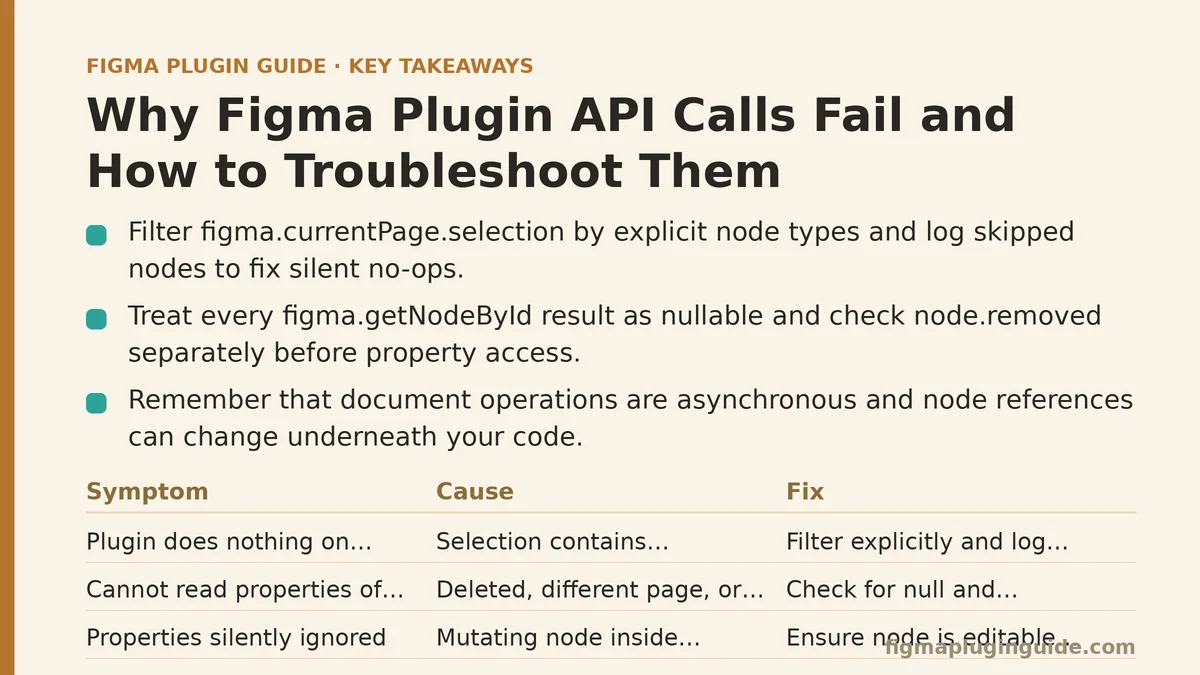
How to Use This Checklist
Work top to bottom. The categories are ordered roughly by how often they account for reported failures, but if you already know which symptom you are seeing, jump straight to that section. Each entry follows the same shape:
- Symptom — what you observe
- Cause — the mechanism producing the symptom
- Fix — the concrete change
The single most important thing to internalize before reading further: in the Figma plugin sandbox, almost everything that touches the document is asynchronous, and almost everything that touches a node is a live reference into a document tree that can change underneath you. Most “the API is broken” reports trace back to one of those two facts.
Symptom: The Plugin Does Nothing on Certain Selections
Cause: You are iterating figma.currentPage.selection and assuming every entry is a type you handle. When a selection contains a node type your code does not branch for — a COMPONENT_SET, a SLICE, a BOOLEAN_OPERATION — your transform silently no-ops, or an early return skips the rest of the loop.
Fix: Filter explicitly by type and log what you skipped. Do not write a transform that assumes a shape.
const SUPPORTED = new Set(["FRAME", "RECTANGLE", "ELLIPSE", "TEXT", "GROUP"]);

function collectTargets(selection) {
  const targets = [];
  const skipped = [];
  for (const node of selection) {
    if (SUPPORTED.has(node.type)) {
      targets.push(node);
    } else {
      skipped.push({ id: node.id, type: node.type });
    }
  }
  return { targets, skipped };
}

const { targets, skipped } = collectTargets(figma.currentPage.selection);
if (targets.length === 0) {
  figma.notify("No supported nodes in selection");
  figma.closePlugin();
} else {
  // proceed with targets
  if (skipped.length > 0) {
    console.log("Skipped unsupported nodes:", skipped);
  }
}
The skipped array is the important part during development. Once you can see exactly which node types your plugin is discarding, the “does nothing” report becomes a concrete list of types to either handle or explicitly refuse.
Symptom: Cannot read properties of null on a Node You Just Found
Cause: You called figma.getNodeById(id) and got null, then accessed a property on the result. This happens for three distinct reasons, and they need different fixes:
- The node was deleted between the time you captured its ID and the time you looked it up.
- The node lives on a different page, and
getNodeByIdsearches the whole document but some workflows assume the current page only. - The ID is stale — it was serialized to plugin data or a JSON file in a previous session, and the document has since changed.
Fix: Treat every getNodeById result as nullable. Check before using, and decide the recovery behavior explicitly.
function safeGetNode(id) {
  const node = figma.getNodeById(id);
  if (node === null) {
    return { ok: false, reason: "missing", id };
  }
  if (node.removed) {
    return { ok: false, reason: "removed", id };
  }
  return { ok: true, node };
}
The node.removed check is separate from the null check on purpose. A node that has been removed from the document can still be referenced by a variable you hold, and reading certain properties from a removed node throws or returns stale data depending on the property. Checking removed explicitly lets you skip those nodes cleanly instead of letting a property access throw halfway through a loop.
Symptom: Properties You Set Are Silently Ignored
Cause: Almost always, you are mutating a node that is either inside an instance, inside a component definition you are not editing, or in a state where the property is read-only. Setting node.characters on a text node inside a locked instance, or setting width on a node using auto-layout, commonly produces no error but also no change.
Fix: Check the mutation preconditions before assigning, not after.
function canMutateText(node) {
  if (node.type !== "TEXT") return false;
  if (node.removed) return false;
  if (node.locked) return false;
  // Walking up to check for instance ancestry
  let ancestor = node.parent;
  while (ancestor) {
    if (ancestor.type === "INSTANCE") return false;
    if (ancestor.type === "COMPONENT" || ancestor.type === "COMPONENT_SET") {
      // Editing inside a main component is allowed, but flag it
      return true;
    }
    ancestor = ancestor.parent;
  }
  return true;
}
Two API details cause most of the confusion here. First, writing to a locked node does not throw in every case — sometimes it is a no-op, which is worse than an error because it does not tell you anything went wrong. Second, auto-layout frames have constrained sizing on their children; a child’s width set is overridden by the layout engine on the next render pass unless you also set the child’s layoutAlign or the parent’s layoutMode to allow sizing.
If a mutation appears to work for one node and not another of the same type, dump both nodes’ relevant properties side by side. The difference is almost always locked, an ancestor instance, or an auto-layout constraint.
Symptom: The Plugin Hangs and Never Calls figma.closePlugin()
Cause: An await that never resolves. In the plugin sandbox this typically comes from a promise you did not await, or a promise rejecting without a handler, so the execution path leaves closePlugin unreached.
Fix: Wrap the entry point so every code path terminates the plugin, and make missing awaits visible.
async function run() {
  try {
    const targets = figma.currentPage.selection;
    if (targets.length === 0) {
      figma.notify("Select at least one node");
      return;
    }
    // ... do work with awaits ...
    figma.notify(`Processed ${targets.length} node(s)`);
  } catch (err) {
    console.error("Plugin failed:", err);
    figma.notify("Something went wrong. Check the console for details.", {
      error: true,
    });
  } finally {
    figma.closePlugin();
  }
}

run();
The finally block is non-negotiable. Without it, a rejected promise inside a nested await chain leaves the plugin open with no visible error, and the user sees a stuck plugin. During development, replace the console.error with a rethrow so the plugin console surfaces the full stack.
One caveat: if your plugin intentionally stays open (for example, a plugin that reacts to selection changes), do not put closePlugin() in finally. In that design, register figma.on("selectionchange", ...) and call closePlugin() only from an explicit user action. Pick one model — auto-closing or listener-driven — and do not mix them, because a plugin that closes itself while listeners are still registered produces confusing repeat-trigger behavior.
Symptom: figma.notify Never Appears
Cause: Notifications are fire-and-forget, but they are also rate-limited and dropped if the plugin closes too quickly. A figma.notify() call followed immediately by figma.closePlugin() in the same synchronous tick commonly shows nothing, because the plugin tears down its UI context before the notification renders.
Fix: For notifications that matter, await a short delay before closing. Figma exposes figma.closePlugin() as the last thing you call, but there is no official “flush notifications” API. The practical pattern is a microtask or short timeout:
figma.notify("Done");
await new Promise((resolve) => setTimeout(resolve, 100));
figma.closePlugin();
Use this sparingly. If your plugin fires many notifications in a loop, Figma drops all but the last, and the dropped ones look like bugs when they are rate limiting. Consolidate into one notification with a count instead of notifying per node.
Symptom: The Plugin Works on Small Files but Not Large Ones
Cause: You are doing an unbounded traversal, or calling figma.getNodeById for every node in a large tree. Both scale poorly, and both eventually hit time or memory limits that surface as a generic failure or a hung plugin.
Fix: Traverse once, in a single pass, and collect what you need instead of looking nodes up by ID repeatedly.
function findByType(root, type) {
  const results = [];
  const stack = [root];
  while (stack.length > 0) {
    const node = stack.pop();
    if (node.type === type) results.push(node);
    if ("children" in node) {
      for (const child of node.children) stack.push(child);
    }
  }
  return results;
}
Two trade-offs to be aware of. An iterative stack-based traversal avoids the recursion depth problems that a deeply nested document can trigger in some environments, at the cost of slightly more code. And getNodeById is not uniformly cheap in a large document — if you are calling it thousands of times in a loop, you are better off building an ID-to-node map from one traversal and reading from it. The map approach costs more memory up front, so for very large documents with narrow needs, a single traversal that collects only the nodes you care about is the safer choice.
Symptom: API Calls Fail Only After awaiting a Network Request
Cause: The document changed while your network request was in flight. You held a node reference before the await, then continued using it after. If the user deleted that node, or applied an undo, the reference is stale.
Fix: Re-resolve by ID after every await, or capture the state you need before the request and operate only on captured data afterward.
async function processSelection() {
  const ids = figma.currentPage.selection.map((n) => n.id);

  const payload = await fetch("https://example.com/transform", {
    method: "POST",
    headers: { "Content-Type": "application/json" },
    body: JSON.stringify({ ids }),
  }).then((r) => r.json());

  // Do NOT use the node objects captured before the await.
  // Re-resolve them:
  for (const id of ids) {
    const node = figma.getNodeById(id);
    if (!node || node.removed) continue;
    // apply payload result to node
  }
}
This pattern costs an extra lookup per node, which is negligible relative to the network round trip. It is the correct default whenever a document mutation follows an await.
Symptom: figma.ui.postMessage Data Arrives as undefined
Cause: The plugin sandbox and the UI iframe communicate through postMessage, and the message payload runs through structured clone. Anything that is not structured-cloneable — the figma global itself, node references, functions, DOM nodes — arrives as undefined or throws, depending on the target environment.
Fix: Send plain data. Serialize node references to IDs on the way out, and look them up on the other side.
// Plugin sandbox -> UI
figma.showUI(__html__);
figma.ui.postMessage({
  type: "selection-updated",
  nodes: figma.currentPage.selection.map((n) => ({
    id: n.id,
    name: n.name,
    type: n.type,
  })),
});
On the UI side, treat node IDs as opaque tokens that only the sandbox can resolve. The UI should never expect a live node and should never try to read properties from one, because it does not have access to the figma object at all. When a message arrives empty, the first thing to check is whether you tried to pass a non-cloneable value.
A Quick Reference for the Fixes Above
| Symptom | First thing to check | Typical fix |
|---|---|---|
| Nothing happens on some selections | Node types you do not branch for | Filter by type set, log skipped |
| Null on a looked-up node | Nullable result from getNodeById | Check null and removed |
| Property writes ignored | Locked nodes, instance ancestry, auto-layout | Check preconditions before assign |
| Plugin hangs | Unawaited or rejected promise | try/finally around the entry point |
| Notification never shows | Plugin closed too fast, rate limit | Delay before close, consolidate |
| Fails only on large files | Unbounded traversal | Single-pass iterative collection |
Fails after a network await | Stale node references | Re-resolve by ID after await |
postMessage gives undefined | Non-cloneable payload | Send plain data, IDs not nodes |
When Not to Apply These Fixes
The checklist above optimizes for correctness under real-world documents, which are mutable, large, and user-controlled. If your plugin operates only on a synthetic document you generate inside the plugin itself, several of these guards are unnecessary overhead — you can skip the re-resolution after await if nothing else can mutate your nodes, and you can traverse recursively if the depth is bounded and small. The trade-off is fragility: the moment you accept user selection or a remote file as input, the guards become load-bearing again.
The honest rule is to apply the guards at the boundary where untrusted input enters your plugin. Past that boundary, you can relax. Before it, assume the document, the network, and the user all change underneath you at the worst possible moment.
The Underlying Discipline
Every failure mode in this checklist reduces to one habit: re-verify the state of anything you hold a reference to before you use it, and never assume an operation succeeded without checking its result. Figma’s plugin API is not inconsistent — it is asynchronous and document-backed, and those two properties explain nearly every “the API is broken” report. Treat node references as short-lived, treat every lookup as nullable, and treat every mutation as something that can be refused, and the majority of these failures stop happening.
Which of the symptoms above matches the failure you are currently chasing — the null result, the ignored write, or the hang after a network call? That answer points to the section to re-read first.
Related guides: Figma Plugin Troubleshooting Mistakes Designers Make and How to Fix Them, Debugging Figma Plugin Errors with the Browser Console: A Beginner and Advanced Guide, and Handling Async Operations in Figma Plugin Development.